Getting startet with SBT
Setting up sbt
Tried installing with Homebrew. But when you see an error like this, you know you better go read the documentations.
error: error while loading String, class file '/modules/java.base/java/lang/String.class' is brokenThe SBT docs say to install with Java 8 or 11. They also recommend using SDKman.
$ sdk list java
	================================================================================
Available Java Versions
================================================================================
 Vendor        | Use | Version      | Dist    | Status     | Identifier
--------------------------------------------------------------------------------
 AdoptOpenJDK  |     | 16.0.0.j9    | adpt    |            | 16.0.0.j9-adpt
               |     | 16.0.0.hs    | adpt    |            | 16.0.0.hs-adpt
               |     | 11.0.10.j9   | adpt    |            | 11.0.10.j9-adpt
               |     | 11.0.10.hs   | adpt    |            | 11.0.10.hs-adpt
               |     | 8.0.282.j9   | adpt    |            | 8.0.282.j9-adpt
               |     | 8.0.282.hs   | adpt    |            | 8.0.282.hs-adpt
 Amazon        |     | 16.0.0.36.1  | amzn    |            | 16.0.0.36.1-amzn
               |     | 15.0.2.7.1   | amzn    |            | 15.0.2.7.1-amzn
               |     | 11.0.10.9.1  | amzn    |            | 11.0.10.9.1-amzn
               |     | 8.282.08.1   | amzn    |            | 8.282.08.1-amzn
 Azul Zulu     |     | 16.0.0       | zulu    |            | 16.0.0-zulu
               |     | 16.0.0.fx    | zulu    |            | 16.0.0.fx-zulu
                                 [.....]
================================================================================
Use the Identifier for installation:

    $ sdk install java 11.0.3.hs-adpt
================================================================================
Do as the man says.
$ sdk install java 11.0.10.hs-adpt
[...]
$ java -version
openjdk version "11.0.10" 2021-01-19
OpenJDK Runtime Environment AdoptOpenJDK (build 11.0.10+9)
OpenJDK 64-Bit Server VM AdoptOpenJDK (build 11.0.10+9, mixed mode)
Also get sbt.
$ sdk list scala
[...]
$ sdk install scala 2.13.5
$ sbt new sbt/scala-seed.g8
....
Minimum Scala build.
name [My Something Project]: hello
Template applied in ./hello
$ cd hello
$ sbt
> runThat should work.
Now open IntelliJ:
$ idea .Open Preferences > Build, Execution, Deployment > Build Tools > sbt. And set JRE to Default which matches the active Java Virtual Machine.
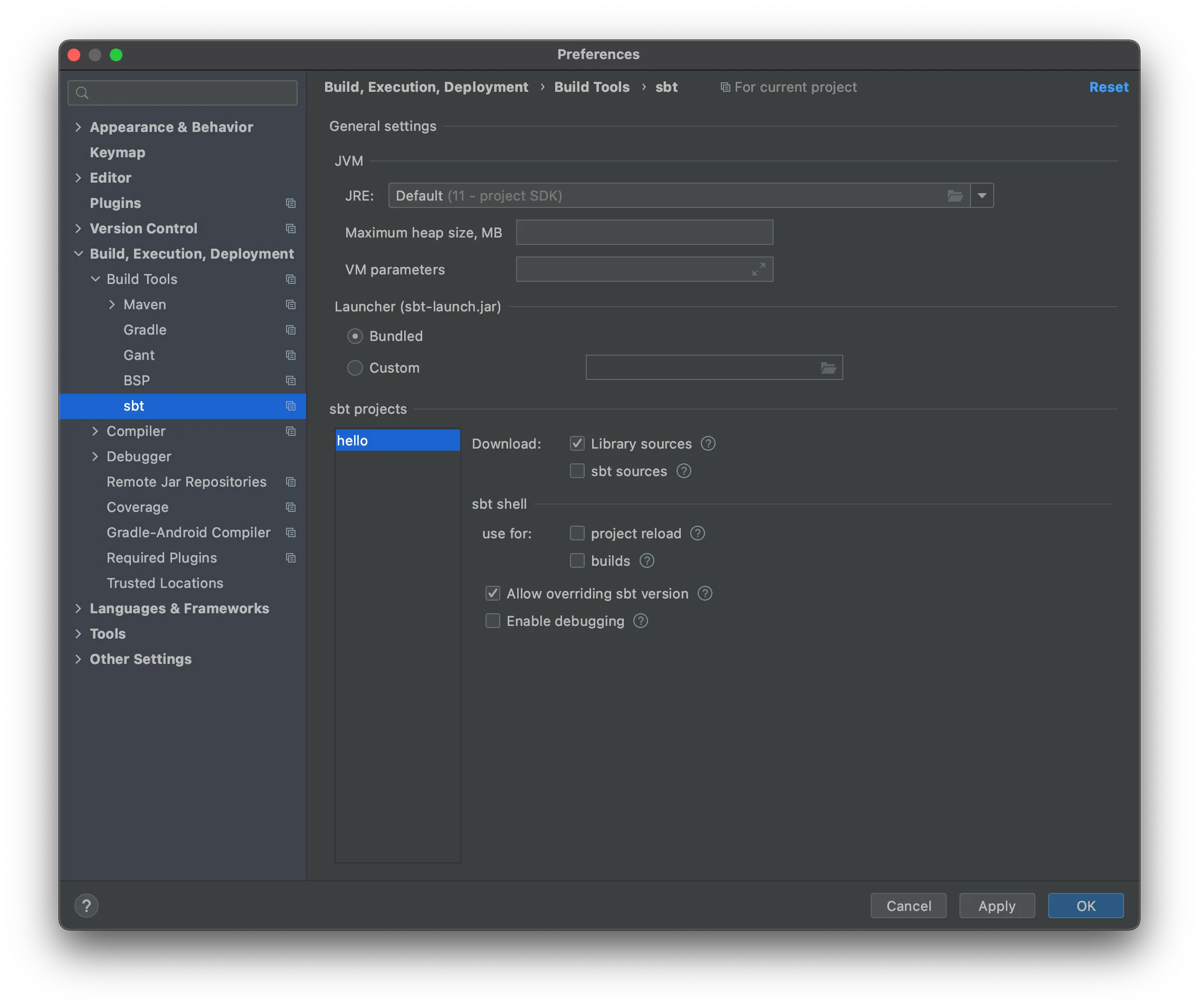
Opening in VSCode if metals is installed automatically asks you’d like to import the project.
$ code .Using sbt
$ sbt
sbt:hello> compile
sbt:hello> run
Prefix with a tilde to enable automatic recompilation upon file changes.
sbt:hello> ~compileWe can modify the build.sbt directly from the sbt shell.
sbt:hello> set ThisBuild / scalaVersion := "3.0.0-RC2"
sbt:hello> scalaVersion
[info] 3.0.0-RC2
sbt:hello> session save
sbt:hello2> exit
[info] shutting down sbt server
$ cat build.sbt
ThisBuild / scalaVersion := "3.0.0-RC2"
To source the build.sbt file in an active sbt session, simply run the reload command.
sbt:hello> reloadTo run tests.
sbt:hello> testOr
sbt:hello> ~testQuickPaste mode:
sbt:Hello> console
scala> :paste
{paste scala code}
{Ctrl-D}
// Exiting paste mode, now interpreting.
List projects in directory:
sbt:Hello> projectsCompile sub-project:
sbt:Hello> helloCore/compilePackage
sbt:Hello> distDockerize
sbt:Hello> Docker/publishLocal$ docker run hello:0.1.0-SNAPSHOT
Hello World!Sources:
- https://www.scala-sbt.org/1.x/docs/Installing-sbt-on-Mac.html
- https://sdkman.io/
- https://www.scala-sbt.org/1.x/docs/sbt-by-example.html

Written by Casper Lehmann who is pushing buttons and making things go in Copenhagen.